Guides / Xfinity
Why Is My Xfinity Internet So Slow? 11 Causes and How to Fix Each
Xfinity internet is usually slow because of weak WiFi, a gateway that needs a restart or replacement, too many devices online at once, busy evening hours, or a problem with the line into your home. Run a speed test with a cable first. If the wired result is fine, the cause is inside your home. If it's low, the cause is your equipment or Xfinity's line.
Takes 30 seconds and shows how your result compares with your Xfinity plan.
Start here: is it your WiFi or Xfinity?
Before you change anything, run two tests: one on WiFi in the room where things feel slow, and one with a laptop plugged into the gateway with an Ethernet cable. This one comparison tells you where to look.
| Wired result | WiFi result | Where the problem is |
|---|---|---|
| Close to your plan | Much lower | Your WiFi or your device (causes 1–5) |
| Low | Low | Gateway, cables or Xfinity's line (causes 6–10) |
| Close to your plan | Close to your plan | Your connection is fine; check the website or app you're using |
A good wired result is about 90% or more of your plan's download speed. Over WiFi, 60–80% is normal. Not sure what your plan is? It's listed in the Xfinity app and on your monthly bill.
Your WiFi signal is too weak where you are
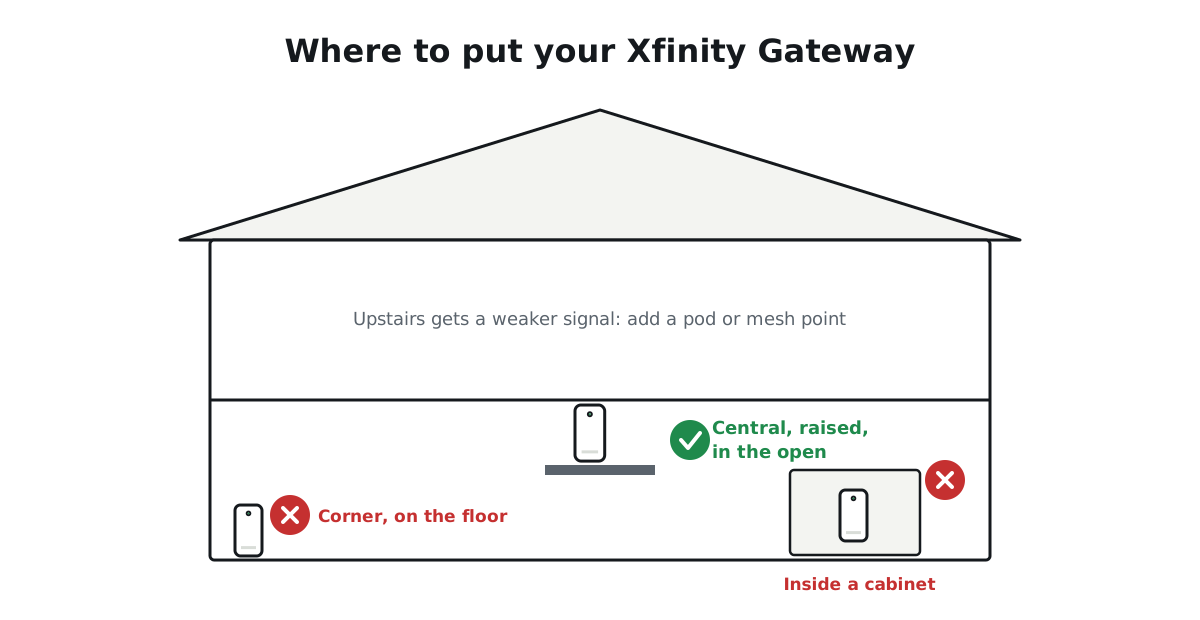
WiFi weakens with every wall, floor and appliance between you and the gateway. A room upstairs or at the far end of the house can get a fraction of the speed you'd see next to the gateway.
How to tell: speed is good near the gateway but drops sharply in certain rooms.
Fix: move the gateway to a central, open spot, raised off the floor and not inside a cabinet. For large or two-story homes, add WiFi extender pods or a mesh system so every room gets a strong signal.
You're connected to the slower 2.4 GHz band
Most gateways broadcast two kinds of WiFi. The 2.4 GHz band reaches farther but is much slower and more crowded. The 5 GHz band is faster over shorter distances.
How to tell: your device's WiFi details show 2.4 GHz, or speeds never go above about 100 Mbps even close to the gateway.
Fix: connect phones, laptops and TVs near the gateway to the 5 GHz network. Leave 2.4 GHz for smart-home gadgets that don't need speed.
Too many devices are using the internet at once
Every device on your WiFi shares the same connection. Several 4K streams, a game download, cloud photo backups and a video call at the same time can use up a smaller plan quickly.
How to tell: things slow down at the same times every day, such as when everyone is home in the evening.
Fix: in the Xfinity app, open WiFi and check your connected devices. Pause anything you don't recognize and change your WiFi password. Schedule big downloads and backups for overnight. If your household regularly needs more, a faster plan may be worth it.
Your phone, laptop or TV can't go faster
Older devices often top out well below fast plan speeds. Many phones reach 300–800 Mbps at most over WiFi, many smart TVs have a 100 Mbps network port, and older laptops may have a 100 Mbps Ethernet port that caps every wired test at about 94 Mbps.
How to tell: one device is always much slower than others in the same spot.
Fix: restart the device, install pending updates, and test on a second device to compare. For a TV or console that stays slow, a wired connection usually helps.
A VPN or background app is slowing you down
VPNs route your traffic through another server, which often cuts speed and raises ping. Cloud backups, game launchers and system updates can also run quietly in the background.
How to tell: speed jumps when you switch off the VPN or close background apps.
Fix: turn the VPN off while testing, and pause or schedule background syncing.
Your gateway needs a restart
Gateways run for months without a break, and small glitches build up. A restart is the single most effective fix for sudden slowness.
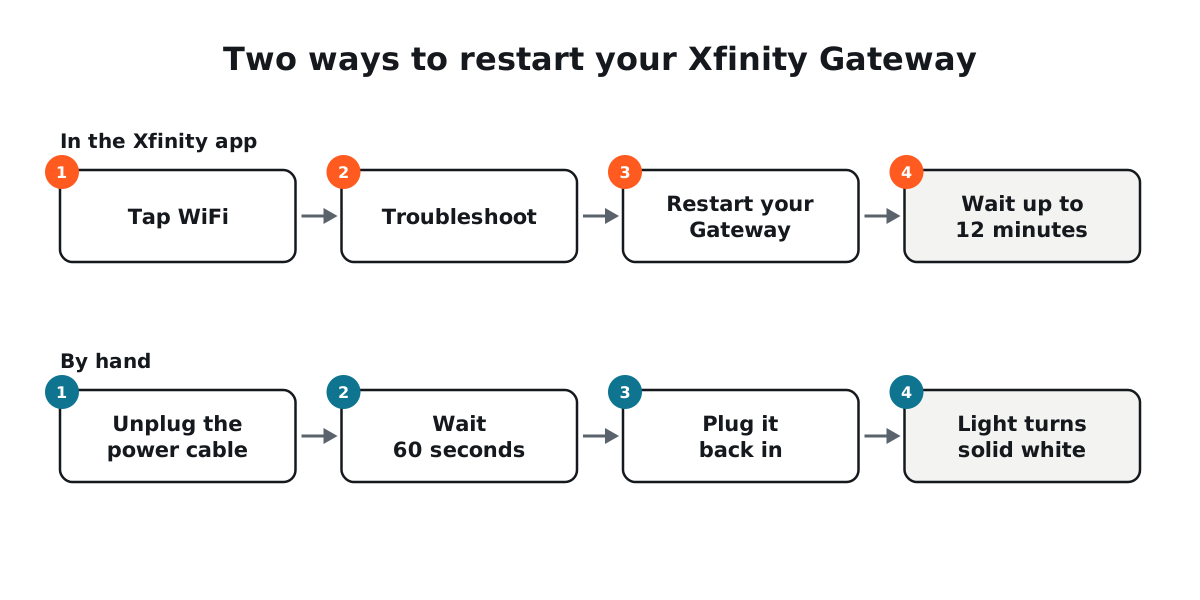
Fix: in the Xfinity app, tap WiFi → Troubleshoot → Restart your Gateway and wait up to 12 minutes. Or unplug the gateway's power cable, wait 60 seconds, and plug it back in. Then test again.
Your gateway or modem is too old for your plan
Older gateways and modems can't deliver the speeds of newer plans. If you own your modem, it needs to be DOCSIS 3.1 to reach gig speeds.
How to tell: wired tests stay well below your plan even after a restart, often stuck at the same number.
Fix: run the whole home network test in the Xfinity app (WiFi → Troubleshoot → Test your whole home network). If your rented gateway can't support your plan, the app offers a replacement. If you own your modem, check its label and Xfinity's approved device list.
A loose coax cable or too many splitters
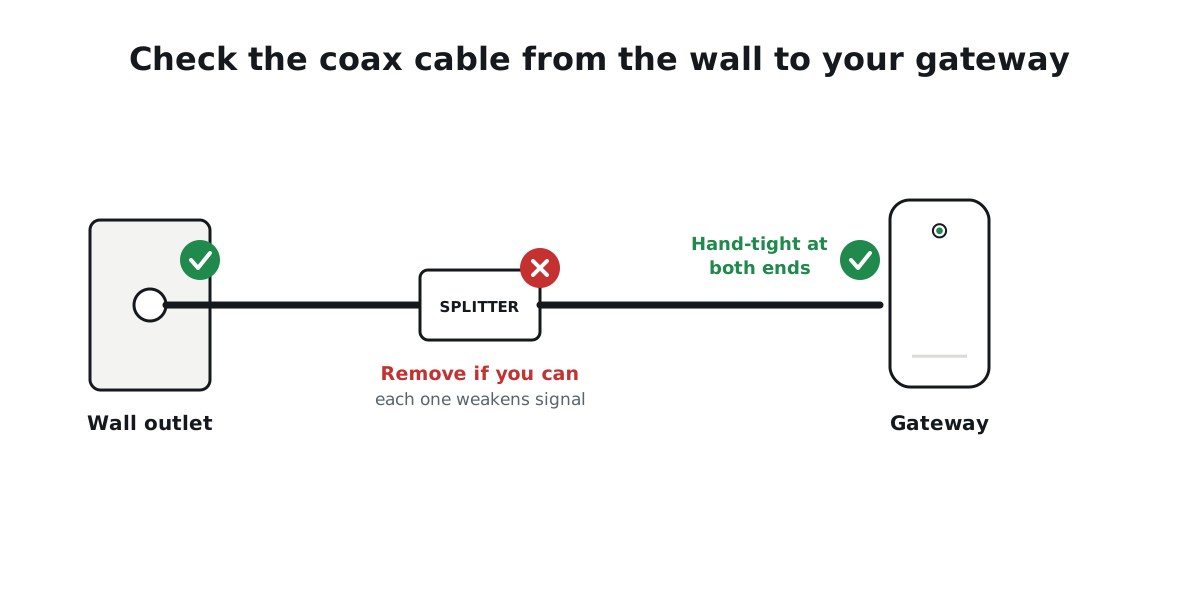
The round coax cable from the wall carries your internet. A loose connector, damaged cable or a chain of splitters weakens the signal before it reaches your gateway.
Fix: tighten the coax cable by hand at the wall and at the gateway. Remove any splitter you don't need. Replace kinked or old Ethernet cables with Cat6.
It's peak time in your neighborhood
Cable internet capacity is shared with nearby homes. Between about 7 and 11 pm, when everyone streams at once, some areas see slower speeds.
How to tell: wired tests are fine in the morning but consistently lower every evening.
Fix: test with a cable at both times for a few days and note the results. A steady evening drop on a wired connection is worth reporting to Xfinity with those numbers.
There's an outage or line problem
Sometimes the problem is outside your home: an outage, maintenance, or damage to the line.
Fix: open the Xfinity app and look for an outage alert near the top of the home screen. If there's no outage and wired speeds are still low after a restart, contact Xfinity support.
Your plan is too small for your household
If wired tests match your plan and your WiFi is strong, yet things still feel slow when everyone is online, your household may simply need more speed.
Fix: add up what your home does at the same time. A 4K stream uses about 15–25 Mbps, a video call 3–4 Mbps and online gaming 10–25 Mbps. Most homes of three to five people are comfortable on 300–500 Mbps.
Still slow? Contact Xfinity with proof
If your wired speed test stays below about 60% of your plan after trying these fixes, contact Xfinity at 1-800-XFINITY (1-800-934-6489), through the Xfinity app, or online at xfinity.com. Have three wired test results ready, each with the date and time, plus the fixes you've already tried. Use only the number on your bill, in the app or on xfinity.com, since scam sites post fake support numbers.
See which change made the difference, and keep your results for support.
FAQs
Why is my Xfinity internet slow at night?
Evening is peak time, when many homes nearby are streaming at once. Some slowdown can be normal, but a large, steady drop on a wired test is worth reporting to Xfinity.
Why is my Xfinity WiFi slow but Ethernet is fast?
Your connection is fine and the WiFi is the bottleneck. Move the gateway to a central spot, use the 5 GHz network, and add pods or mesh for far rooms.
Does Xfinity slow down internet on purpose?
Network management policies vary and can change, so check Xfinity's current network management and broadband label information. For most slow-speed complaints, the cause is WiFi, equipment or peak-time congestion, which the steps above help you find.
How do I make my Xfinity internet faster?
Restart your gateway, place it centrally, use 5 GHz WiFi, connect gaming and TV devices with a cable, pause background downloads, and make sure your gateway or modem supports your plan.

Tino Ropar
Technology Researcher · Reviewed by Marco Elizondo
Computer Science graduate and technology researcher at InternetSpeedX. Tino researches how broadband networks work, how internet performance is measured, and what affects connectivity at home, checking every guide against technical documentation and information from internet providers.